


The rejuvenated PlayStation 4 and PlayStation 4 Pro are the biggest console release of the year and offers gamers a very slim and performance oriented device with powerful experience. Now we would like to explain you how to set up both.

The first part is obviously to attach the device to the TV and the rest will be explained afterwards.
- Insert the HDMI cable of your console and attach it to TV source.
- Insert the power cable to the back console.
- Insert the other end of the cable into socket available at your home, if it doesn’t comply with your power cable, use extension.
- If you are not using internet, insert Ethernet cable into the back of console.
- Insert one end of the microUSB which then works with DualShock 4 controller, and the other end goes to USB port of PS4.
- You can now switch on the PS4 by pressing the power button which resides within the console front end.
Related News
 How to play PS4 games on PC.
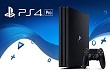 Sony’s new gaming console is play station 4 pro
 How to show your Android device on your TV?
 How to make iPhone 7 button more customization.
 Sony releases upgraded PlayStation VR headset
 How to root Samsung Galaxy Note 4
 How to back up your iPhone before installing iOS 10.3
 How to fix iphone 7 and iphone 7 plus black screen of death?
