



To free up space in this new Android update is very easy
First go to Settings > Storage.
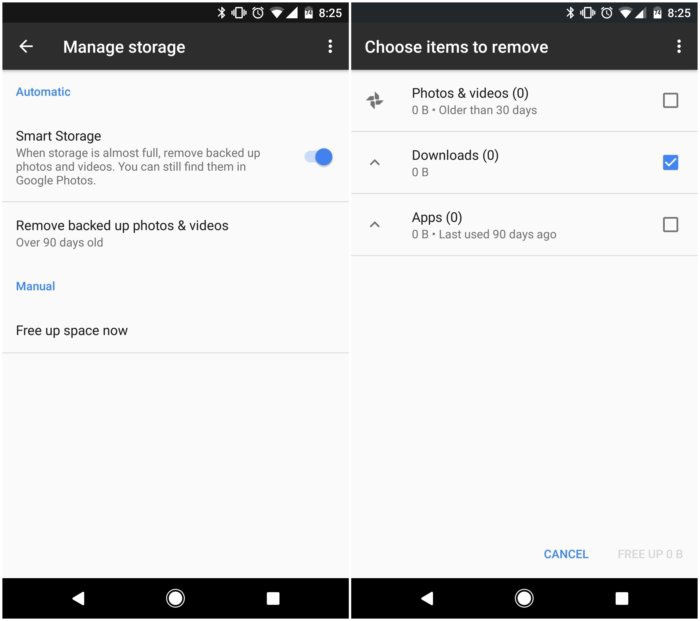
There is new tool in this named as Manage Storage at the top. You will see Smart storage which when you toggle will remove backed up photos and videos when the memory is full.

If you get Free up now you will get more specific options for removing the stuff from your phone. It also gives you lot of suggestion if you want to delete the unused items
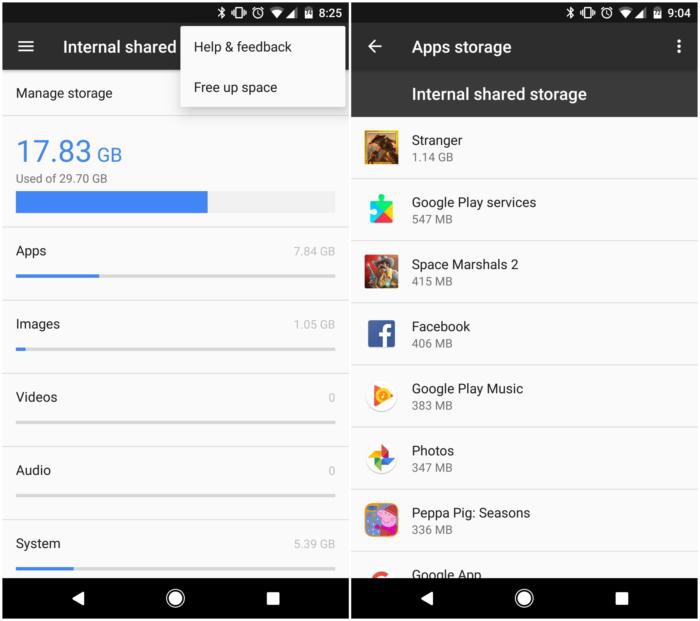
You will also get the detail of the most storage using apps so you can delete them if you do not need them
From the shared storage menu you can touch on any of the categories e.g. apps, images, or videos. In this way you will come to know which app is using more storage. You can also touch the overflow menu and go to Free up space if you directly want to free up storage
Related News
 Over 82 billion apps installed from Google Play (2016)
 Apple’s App Store Finally in Its New Look with IOS 11
 How to hide your personal private photos by using Google Photos??
 How to make iPhone 7 button more customization.
 How to apply filters for Google Photo Filters.
 How to email more than five photos at once in iOS 10
 How to Block numbers with Messenger.
 How to get rid of Spam numbers.
