


Samsung did focus on quality of Note 4 rather than its size as compare to Note 3. Samsung improved its software cleverly for better user experience. The elegance of Note 4 is much better than Note 3. It gives premium look and feel when you will carry this Note 4 in your hand. The function of S Pen has become more functional, logical and looks like a part of package.
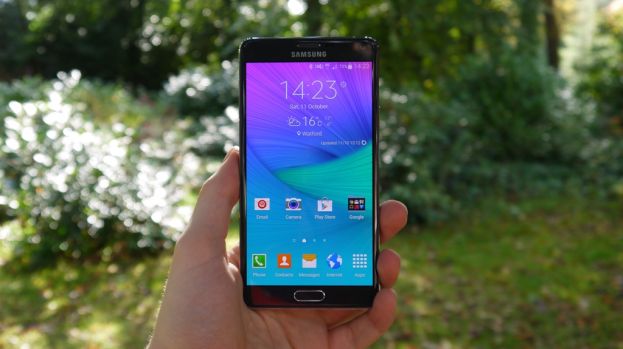
Samsung Galaxy Note 4 Review
The screen now boasts Quad HD Super AMOLED (2,560 x 1,440 resolution) technology that stretches to 500 pixels per inch. Couple this with what Samsung is calling an adaptive display – one that changes depending on the light of the place you are viewing the screen – and on paper you have the optimum viewing no matter what situation you are in. There is a lot of similarity between the Note 3 and its successor. Size difference between the two chassis is definitely negligible – the Note 4 comes it at 153.5 x 78.6 x 8.5mm, compared to the Note 3’s 151.2 x 79.2 x 8.3mm size. it’s obvious that Samsung hasn’t re-invented the Note range but refined it with clever software updates and slight tweaks here and there. Samsung has definitely observed about its latest line-up feeling plastic-y in the hand and has decided to give the Note 4 more of a premium finish, with a metal rim surrounding the handset, shielding the rest of the chassis like a velvet rope protecting celebs from real people in a club. I love the way the Galaxy Note 4 feels in the hand and being a regular user of the Note 3, it definitely felt different enough and it’s light too, just a touch over the weight of the Note 3 at 176g. The most notable is the heart rate monitor on the back which also has a neat camera functionality and the back has been improved somewhat too, but is still a little too artificial leather for my liking.
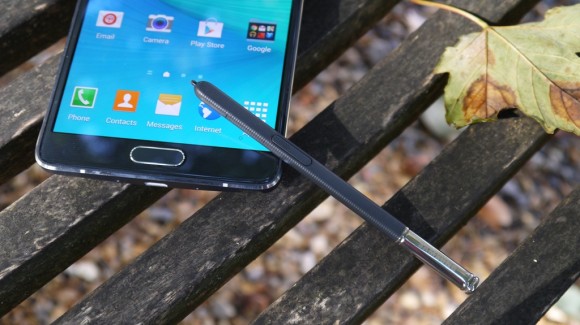
Galaxy Note 4 S pen
The Samsung S pen has been improved and gives the real feel of writing on a paper in natural handwriting flow and rhythm. User can also use S Pen just like mouse. Click he button on the side of the S Pen and you are in Smart select mode. Where you can highlight whole passages of text from a website, or even clip out sections of a site and put it into your own clippings archive. Snap mode has also been improved on the Note 4. While you used to just be able to snap two separate services to the top and the bottom of the screen, you can now “resize” an app much like you would a widget. Key features
- 5.7″ 16M-color QHD Super AMOLED capacitive touchscreen with curved Gorilla Glass 3
- Android OS v4.4 KitKat with TouchWiz UI
- LTE Cat 6 support
- Quad-core 2.7GHz Krait 450 CPU, Adreno 420 GPU; Qualcomm Snapdragon 805 chipset
- 3GB of RAM
- 16MP OIS camera with 2160p video recording @ 30fps, 1080p @ 60fps, 720p @ 120fps
- 3.7MP front-facing camera, 1080p video recording
- Wi-Fi a/b/g/n/ac, Wi-Fi Direct and DLNA, Download booster
- GPS with A-GPS, GLONASS
- 32GB of built-in storage; microSD card slot
- S Pen stylus
- Enhanced Multi-window multitasking support
- Fingerprint scanner with PayPal support and private mode access
- microUSB 2.0 port with USB host and MHL 2.0
- Bluetooth v4.0
- NFC
- IR port for remote control functionality
- Standard 3.5mm audio jack
- Accelerometer and proximity sensor
- Heart-rate monitor
- Active noise cancellation with a dedicated mic
- 3,220mAh battery
Main disadvantages
- Rear-mounted mono speaker
- microUSB 2.0 is a downgrade over microUSB 3.0 on the Note 3
- The uneven gap between the metal frame and curved screen glass takes a few points away from an otherwise excellent build
- No enhanced resistance to liquids or dust
- Wireless charging support only with an optional back cover
Related News
 Samsung Galaxy A7 2017 Review
 Samsung S6 Active Fully Revealed By Samsung US
 Samsung Galaxy S6 edge+ is announced in India, Pakistan’s launch imminent
 Samsung Galaxy A7 2016 Review.
 Samsung Galaxy Tab S2 duo will release in Korea on August 11
 Samsung Galaxy S6 tied with Note 4 for the best smartphone display
 Verizon is selling Galaxy Note 4 and Motorola Droid Turbo at 50% off.
  Samsung might launch S8 Plus next year.
