


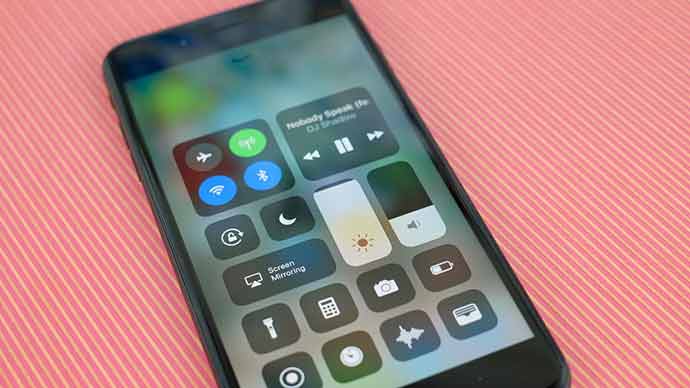
To control various functions of the mobile phone, there is a revamped control center of iOS 11 where user can add or remove shortcuts of his choice.
Three pane view was a mess as user swipe through each panel he has number of tools and apps but going through was inconvenient. To fix this, Apple has redesigned the control center altogether. Apart from few permanent buttons, user can customize shortcuts as according to his needs.
Media control, clock, volume, brightness, Bluetooth, Wi-fi and more could be added to the control center of iOS 11 as it can add up to 18 shortcuts.
In order to customize the control center, open the settings and go to control center. Once there, go to customize controls. User would get list of options which he can add or subtract. Add is with green plus sign and subtract is with red minus sign. By tapping on green icons, user can add and on tapping red ones, user can subtract.
Related News
 iOS 11 New Control Center, Get Ready for Surprise
 iOS 11 Releasing Today, Some Key Feature is Missing
 With IOS 11 Users Can Facilitate with Business Chats for IMessage
 Apple’s App Store Finally in Its New Look with IOS 11
 IOS 11 Developers Preview in terms of Camera App!
 iOS 11 overtakes iOS 10 by currently running on 47% Apple mobile devices
 Apple’s New Emojis Come with Latest Update of iOS 11
 Learn iOS 11 Trick for Rearranging Home Screen
