


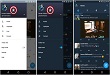
Last month, Twitter has formally introduced Night Mode for Twitter in its Android Application. By activating this Night Mode White background with black works can be converted into Black Background with White words. This makes seeing text at night easier.

Disabling this feature makes the screen again White for Background and Black in words.
The Good news is Twitter has rolled out this feature for iOS users. Twitter also introduced another feature Quality Filter. This will block Duplicate Tweets and Automated Content.
In order to activate Night Mode, Click Me Tab at the bottom of the page. Click setting Mode and turn on Night Mode.
Twitter update is primarily being rolled out to many iOS devices while soon it will launch for rest of the users.
Related News
 Twitter is testing Night mode in its Android Alpha App.
 Twitter Introduces Dark Mode.
 Twitter Now Automatically Sets Night Mode on Android App
 Click Photographs in Low-Light with WhatsApp Night Mode Feature
 You can now hide reactions and comment on Facebook Live.
 You can now stop comments on Instagram.
 Facebook introduces HD video feature on Android.
 WhatsApp to have a Night Mode Feature Soon
