


Back in the late 2000s, the BlackBerry held a special place in the world of smartphones. In 2010, it was still a hefty contender in the US and every carrier had at least couple of BlackBerry models. Android was considered as a second option. But then things dramatically changed.
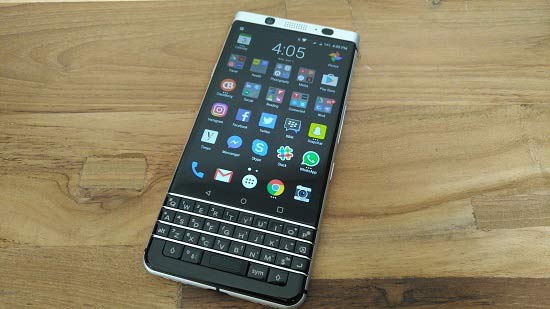
BlackBerry KEYone – A Practical Phone for Professionals
In January 2017 – TCL and BlackBerry teased the world with the BlackBerry Mercury, the codename. It was in late-February at the MWC that we got to know other details about it. What does the BlackBerry KEYone means for the Canadian company and TCL, the Chinese phone maker that’s producing the hardware. TCL’s collaboration with BlackBerry is meant to get some market share back that BlackBerry lost over the past many years to an evolving landscape of touch-screen smartphones.
Overview of BlackBerry KEYone Main Features
Body: Anodized aluminum frame, Gorilla Glass 4 front, soft-touch texture on the back. Touch-enabled backlit full QWERTY keyboard. Black silver and chrome colors.
OS/Software: Android 7.1 Nougat; BlackBerry Hub and various UI enhancement, BlackBerry’s suite of apps
Display: 4.5-inch IPS LCD, 1620x1080px resolution, 3:2 aspect ratio, 434ppi
Memory: 3GB of RAM; 32GB on-board storage, expandable up to 2TB via microSD card
Battery: 3,505mAh battery (sealed) with Quick Charge 3.0 support
Connectivity: Single-SIM; LTE-A Cat9 450/50 Mbps, USB-Type C (v3.1); Wi-Fi a/b/g/n/ac; GPS; NFC; USB OTG; FM Radio; Bluetooth 4.2
Rear camera: 12MP Sony IMX378 sensor, f/2.0 aperture, PDAF, 1.55µm pixel size, dual-tone LED flash, HDR, 4K recording @ 30fps, 1080p@30fps with video stabilization (EIS)
Front camera: 8MP fixed-focus camera with 84° wide angle, selfie flash, HDR, 1080p video @ 30 fps
Chipsets: 14nm Qualcomm Snapdragon 625: Octa-core 2.0 GHz Cortex-A53, Adreno 506 GPU
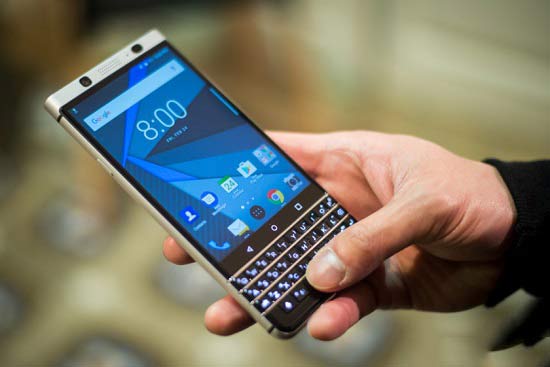
BlackBerry KEYone – A Practical Phone for Professionals
Other features: Single bottom-firing speaker, Fingerprint reader embedded into space bar, 3.5mm audio jack
What’s the catch?
While the device has tons of great features and specs, it has some shortcoming as well. These include the CPU which is not top-notch but it is still very power efficient. It has 3:2 aspect ratio which means that some apps may not render in the right way. Lastly, the phone is only available in one color.
Hardware and design
The KEYone is a thick phone unlike what the top smartphone manufacturers are coming up with nowadays. At 9.4mm, it is surely nowhere close to the thin devices out there. The phone is bold as well as pretty attractive. Don’t expect a dark and shadowy slab of glass. In fact, it’s well organized orchestra of sensors, keys, buttons and materials offering a prefect visual masterpiece.
You will find a speaker grille centers over the top bezel of the device, overlapping between a front-facing 8MP camera, and a setup of the proximity and light sensors. There is a small RGB-LED for notifications close to it and under the top bezel is a 4.5-inch LCD touchscreen display having a 3:2 aspect ratio.
Following the display are the capacitive navigation keys placed above the BlackBerry’s signature QWERTY keyboard. The keyboard is embellished with metal inserts between each row of keys. Embedded into the spacebar is a fingerprint scanner.
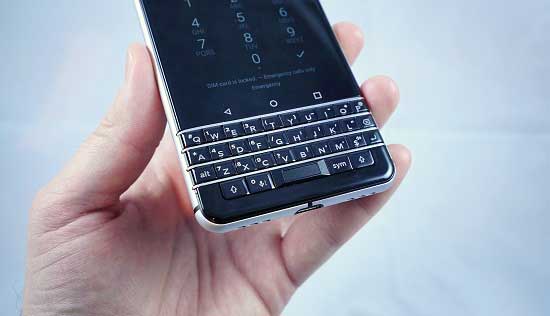
BlackBerry KEYone – A Practical Phone for Professionals
There’s a 3.5mm headphone jack at the top while a noise-cancelling microphone is placed opposite to it. The nanoSIM and microSD card tray are placed on rounded edge on the right which are accessible with a SIM tool. The volume rocker and the Convenience Key are placed below.
On the bottom edge of the device lies the USB-C port and on either side is one of 2 sound grilles. The in-call microphone is on the left while on the right is a loudspeaker. The power key is on the left corner as usual. At the top is a 12MP camera and a dual-tone LED flash is placed adjacent to it.
Display
The KEYone packs a 4.5-inch IPS LCD touch display with a 3:2 aspect ratio. The resolution is cropped from a 16:9 1080p display that means there are still 1080 pixels going across, however the display is just 1620 pixels high. On the whole, this display is very sharp at 433ppi. Colors are vivid and accurate.
Connectivity
The BlackBerry KEYone features Snapdragon 625 that makes it pretty versatile in terms of network connectivity due to its quad-band GSM modem. The phone has LTE-A with theoretical download speeds of up to 450Mbps and upload speeds of 50Mpbs.
Couple of variants for the Americas are there of which one will work in Canada, Latin America, the US, and the Asia-Pacific region while the other is designed for the US and comes with CDMA network compatibility on Sprint and Verizon.
All variants will support Wi-Fi 802.11 b/g/n for 2.4GHz and 802.11 a/n and ac for 5GHz. Wi-Fi Direct, Bluetooth 4.2, A-GPS, GLONASS, BDS2, and FM radio are there as well. You can use a USB OTG in order to connect external storage. The USB-C port is capable of USB 3.1 speeds and Qualcomm’s Quick Charge 3.0. You can use NFC for mobile payments too.
Battery life
The BlackBerry Priv had a fairly large battery (3,410 mAh) but still an inefficient Snapdragon 808 chipset and a power-sucking 5.4-inch QHD display were the causes for poor battery life but this time the components should provide a much better experience with a smaller, lower res scree together with an additional a power-efficient mid-range CPU compliment the 3,505 mAh battery is likely to do well.
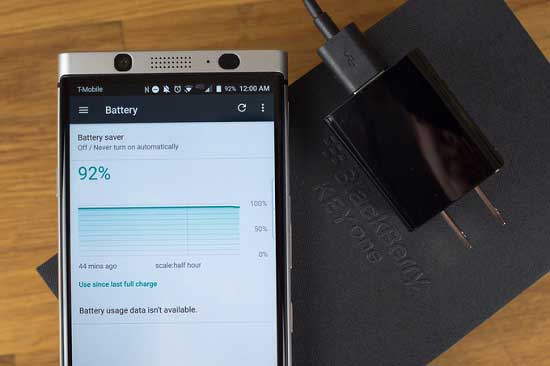
BlackBerry KEYone – A Practical Phone for Professionals
Android Nougat with BlackBerry Apps
The KEYone comes running Android 7.1.1 out of the box with a stock/vanilla look and feel in most cases. The keyboard of the device is permanent and always there. The exceptional 3:2 aspect ratio may bring inconsistencies with few apps such as games or Snapchat. While the nav buttons have been under the virtual keyboard on Android, here they are amid the keyboard and the display.
Lock Screen
You get a large clock on the lock screen with a couple of shortcuts, and standard Nougat behavior for notifications. Along with the standard options for screen lock, you will see “picture password” which is another option. A randomized number grid shows over a predetermined photo and if you need to unlock, you have to drag a pre-chosen number over a predetermined spot on the snap.
The KEYone’s launcher
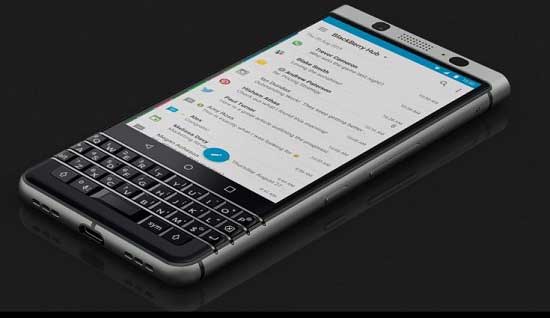
The KEYone’s launcher seems to be much similar to the stock Google launcher, but there are some changes. The default grid is 5×5 plus four apps at the dock. The dock’s middle spot is kept for the app drawer button. The launcher also natively supports icon packs. BlackBerry has added a feature into its launcher that prevents your home screens from getting clogged up with widgets. You can swipe up on any app’s icon that supports widgets and you’ll get a pop-up version of that app’s widgets.
BlackBerry KEYone – A Practical Phone for Professionals
Masonry – the default app switcher
The default app switcher view is called “Masonry” and arranges apps in a clumsy and unpredictable arrangement.
Productivity tab
There is the “Productivity tab” as well which enables you to view the most important information for your day fast and easy as well as your calendar, tasks etc.
The BlackBerry Hub
The BlackBerry Hub is a powerful feature that allows you to enjoy organization to your notifications which will help you never lose track of messages or alerts. It is mainly an inbox for all your notifications.
DTEK
DTEK is BlackBerry’s security-centered app for keeping sensitive data secure. It can track, detect, and control individual app permissions. In addition, it gives you a score based on the settings and features enabled on your device.
Notable
Notable packs great editing tools for drawing and writing on screenshots in addition to writing hand-written notes.
Persistent notification
The BlackBerry Calendar app doesn’t offer added abilities over Google Calendar. You can use Google Calendar to create your events and it can sync to BlackBerry Calendar.
Tasks
The tasks app offers syncing with Microsoft Exchange/Outlook, Novell GroupWise, and Hotmail/Outlook.com task lists.
BlackBerry Keyboard
Keyboard is one of the main features of the phone. What it does is not what many of the desvices can do nowadays. It is the keyboard shortcuts. Here are some of the shortcuts that can be used in the BlackBerry Hub app:
S – perform a search
C – compose an email
T – scrolls to the top
B – scrolls to the bottom
U – scrolls through each unread item
P – scrolls by day
FM Radio
The KEYone has a built-in FM radio and a pair of headphones needs to be plugged into the jack for signal. You can scan for local channels and do much more like edit their names.
Google Photos
Google Photos is the default photo viewer on Blackberry Keyone. You can enjoy an extensive photo editing tool that lets you crop, rotate, adjust various levels as well as tons of other features. It can also be used to create collages, make gifs out of multiple photos, or generate a video clip.
Video playback
The default video player is the one there is there in Google Photos. It helps you will play videos, and will let you skip forward or back a video.
Audio quality
The BlackBerry KEYone has unparalleled audio quality. The output is very nicely loud and it’s overall a pretty great performance.
BlackBerry KEYone – A Practical Phone for Professionals
Camera
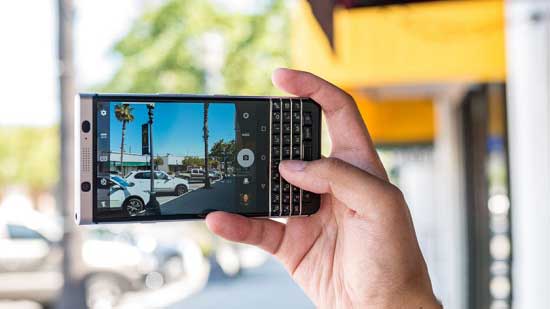
TCL has done a great job for the BlackBerry KEYone. It looks similar to the Pixel’s on paper as you get the same aperture at f/2.0 and the same size pixels at 1.55 microns. You get PDAF and a dual-tone LED flash as well. The camera is set to an aspect ratio of 3:2 to optimize the use of the display. The interface and stability of the camera app is much better compared to the BlackBerry Priv. there are various features that are packed in the camera. Manual mode gives you the power to control focus, ISO, shutter speed, white balance, and more. There are two HDR modes for you to choose from.
You can also enjoy the dedicated video viewfinder in the camera app. It is possible to choose between several video modes. The camera of the KEYone is impressive for low light photography as well. While the selfie camera doesn’t do miracles, the quality of image it provides is good enough for anyone with selfie fever.
Video recording
The KEYone has a number of different video modes including 24fps, 30fps, and 60fps options with varying resolutions. You can shoot 4K at 30 or 24fps, and you can shoot 1080p (or 720p) video at 24, 30, or 60 fps. 4K videos are sharp and provide plenty of detail.
Our Verdict
BlackBerry and TCL have made a valuable contribution to the world of smartphones in the form of BlackBerry Keyone. The device is a great and offers physical keyboards with a security-oriented software experience. However, if you need a phone that is perfect for gaming and best for multitasking, Keynote may not be the best option. It is more for the person who does not have much time to waste on a smartphone or for one who needs a separate phone for work. All in all, a practical phone for practical people.
Related News
 Now BlackBerry is FCC Certified
 BlackBerry KEYone released in North America today.
 BlackBerry KEYone Sets New Record.
 Get $50 price cut on BlackBerry Keyone for today!
 Customers going bonkers over BlackBerry KEYone, phones sold out online in US
 Blackberry KEYone Arrives in India
 AT&T to Offer Blackberry Keyone from September 1
 Rogers BlackBerry KEYone Update
