


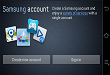
One of the very fundamental of using smartphone is opening the necessary accounts of the brand it belongs to. For instance, in iOS you will make an Apple account and for Android you should make a Google account.
The case with Samsung users are different, while the have to create Google account, they also have to make a Samsung account.

It is not as stuffed as Google Play, but it contains many app that are useful for Samsung users. The Samsung Account is the one that can give you access to basic apps by Samsung.
In order to get these apps, follow the steps. These are applicable to any Samsung device.
1: Firstly go to setting menu in the Samsung app. Move down until you get the setting tab.
2: There you will find Add Account option, from where you are prompted to select Samsung option on the next page.
3: After opening Samsung account menu, first enter your email address that you want to link to your account.
4: Lastly, type your password for your account. And write it somewhere where it accessible to make you memorize it.
5: Your account will be verified via e-mail that will be sent on your associated e-mail address.
This way, you will have full access to your Samsung account. Remember you can use this account on all Samsung devices. So don’t delete it for future use.
Related News
 Microsoft has Ended the hassle to remember the Password
 Facebook has introduced Multiple Account Support on its Android Messenger
 Facebook has discontinued username and password for developers.
 Samsung is already rolling out an early update to Samsung S7 edge
 Report: Google introduces Anti-Phishing Feature to Gmail on iOS
 Samsung app (Wemogee) uses emojis to help people with language disorders to communicate
 Facebook has introduced account Switch facility to iOS.
 New update for Samsung Galaxy A8 (2018) rolled out!
